
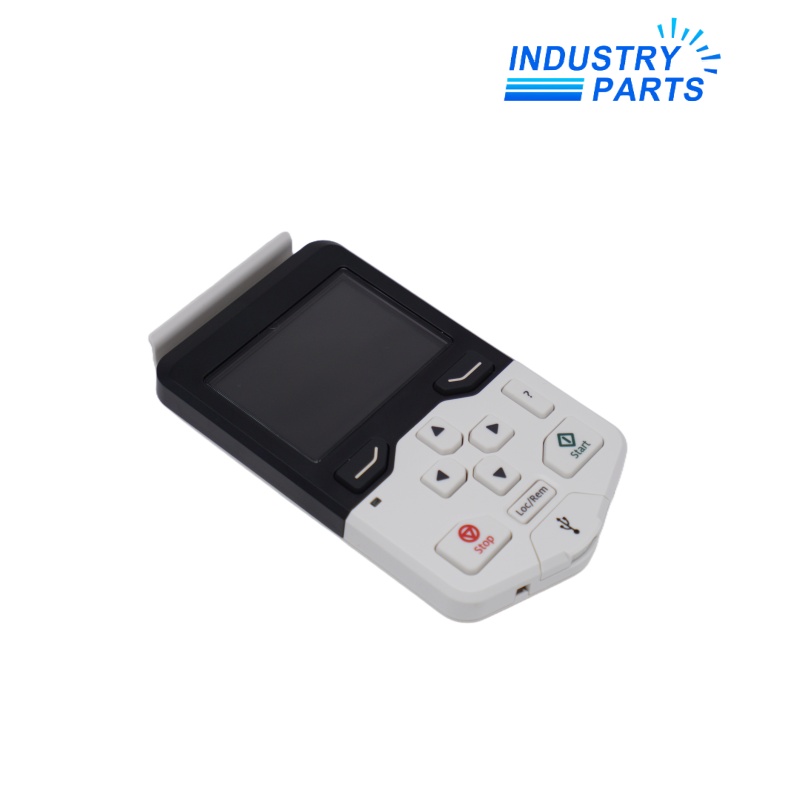


ABB ACS-AP-I Assistant Control Panel
01Technical Summary
ABB ACS-AP-I is a wired assistant control panel for commissioning, operating, monitoring, and maintaining compatible ABB drives. Its keypad, display, help functions, customizable views, menu-driven programming, and panel-to-PC connection provide a consistent local interface across multiple drive families.
02Applications
Typical Uses
- Local commissioning of compatible ABB variable-speed drives.
- Parameter review, adjustment, backup, and restoration under the applicable drive manual.
- Live monitoring of selected drive values and operating status.
- Fault and warning review during maintenance.
- One-panel service workflows across supported ABB drive families.
Selection Boundary
- Use the exact model and manufacturer identity shown on the installed product.
- Treat application examples as context, not as proof of compatibility.
- Confirm electrical, mechanical, communication, safety, and environmental requirements before ordering.
03Specifications
| Manufacturer | ABB |
|---|---|
| Model | ACS-AP-I |
| Current ABB Product Record | 3ABD0000088311 |
| Product Type | Wired assistant control panel |
| Drive Connection | RJ45 panel connection |
| Operator Interface | Graphical display and navigation keypad |
| Programming Method | Menu-driven parameter access |
| Monitoring | Customizable texts and views for selected values |
| Panel Identification | Hardware and firmware details available through System info |
| Manual Applicability | ACS-AP-I hardware C or later and panel software 4.61 or later |
| Wireless Interface | No; wireless operation is provided by ACS-AP-W variants |
| Service Connection | Panel-to-PC USB workflow supported by the assistant-panel platform |
04Features
Design and Functions
- Intuitive navigation and a dedicated help workflow simplify setup and troubleshooting.
- Customizable home views display the values that matter for the application.
- Menu-driven programming reduces dependence on parameter-number memorization.
- Local-language support improves operator usability.
- The panel can display its own product type, hardware version, firmware version, and serial information.
- The wired ACS-AP-I should not be described as a Bluetooth panel.
Product Identity
- Manufacturer: ABB
- Model: ACS-AP-I
- Product Type: Assistant Control Panel
- Review Status: Verified
05Compatibility
- ABB lists ACS180, ACS280, ACS380, ACS480, ACS580, ACS880, ACS580MV, and ACS6080 among compatible ACS drives.
- ABB also lists ACQ580, ACH480, ACH580, DCS880, and DCT880 as compatible drive families.
- Confirm support in the exact drive hardware and firmware manual because family-level compatibility can vary by release.
- Match the panel interface, mounting platform, extension cable or door-mount kit, and required environmental protection.
- Do not substitute an ACS-AP-W or other panel variant without checking wireless, firmware, and drive compatibility.
06Maintenance & Replacement
- Record the panel model, hardware revision, firmware, and the connected drive type before exchange.
- Back up drive parameters with the approved panel or engineering tool before maintenance.
- Inspect the RJ45 connector, panel clip, mounting platform, cable, and enclosure seal.
- After replacement, verify local/remote control, direction, reference, parameter access, monitoring views, faults, warnings, and panel-to-PC communication.
- Follow all electrical-safety instructions supplied with the drive; the panel does not isolate hazardous voltage.
FAQFrequently Asked Questions
What is
ACS-AP-I is a wired ABB assistant control panel for compatible drives.
Where is this product used?
It is used for local drive commissioning, parameter management, operation, monitoring, backup, and fault review.
What should be confirmed before ordering?
Confirm the complete model or part number, manufacturer, installed hardware revision, electrical design, interfaces, wiring, approvals, and project configuration.
What information should be recorded before replacement?
Record the drive type and firmware, panel hardware and firmware, parameter backup, mounting hardware, cable arrangement, user language, and custom home views.
Is another model a direct replacement?
A different ABB panel must be checked against the exact drive family, firmware, required functions, wireless requirement, and mounting arrangement.
What should be checked after installation?
Verify display and keypad operation, local/remote selection, parameter access, monitored values, backups, faults, warnings, and communication with the drive.
+Recommended Models
| 0AC808.9-1 | KMEB-2-24-M12-0,5-LED | 6ES7650-1AL11-6XX0 |
| ABB TA5123-2AI-RTW 1SAP187100R0202 | RMC3 | D-67722,MX-SM-N25-PW |
| KFD2-SR2-EX1.W | ABB RXMVB2 RK 251 205-ON | 9319200220 |
| TC809C1004 | 140012 | 506001MED-8017X |
| 88974041 M3 CD12-8I/40 | SM322 32DO 6AG1322-1BL00-2AA0 | 108-312101-02 015-100153-04 |
| E1411B | RS900-HI-D-C2-C2-00 | 6AG1241-1AH32-2XB0 |
| DGBP-E2CRS | 1C31219G01 | GE 116B6708G43A73A4 |
| NJ20+U1+A2 | 360G2-CRT12C-SM-PT | FMC250 |
| 779153-001 DL360G9 | DTC5500LMX | 6ES5375-1LA41 |
| S4-34895 | 8816001039 USB-I485 | 34.51.7.024.0010 |